
Speaker profile
Get to Know Your Event Speakers
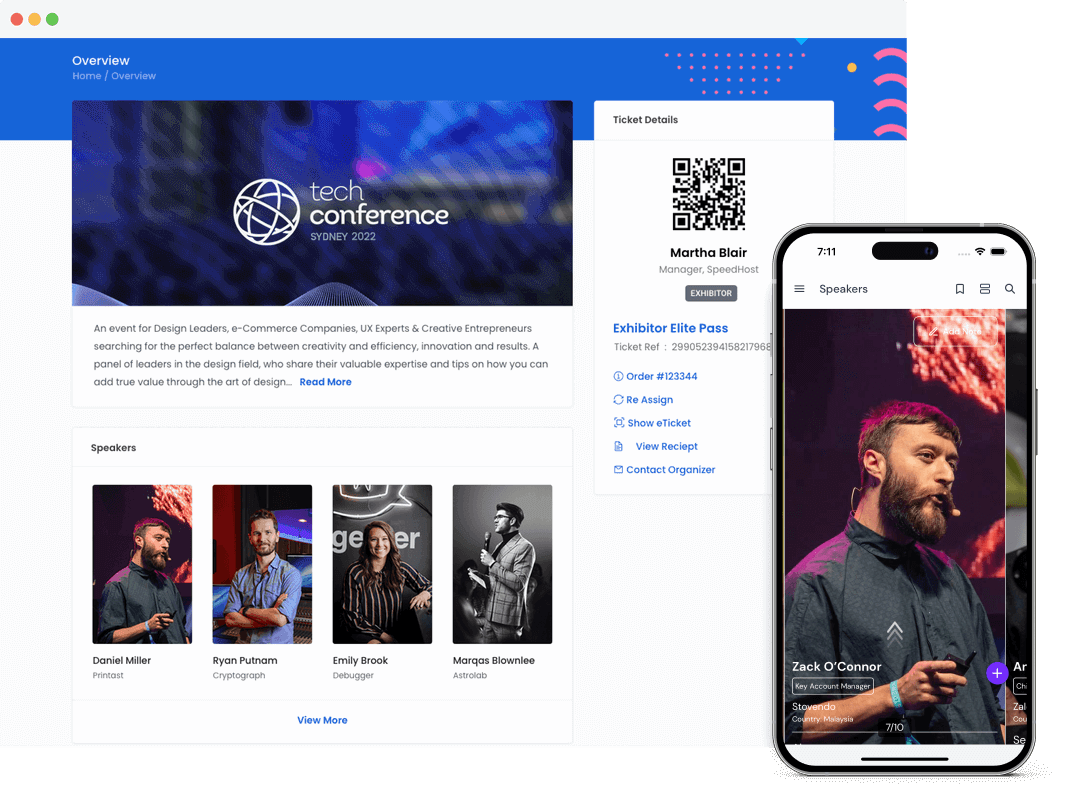
Eventspot speaker profiles are the best way to break the ice with attendees during an event. Connecting with speakers at conferences is easier than ever! Attendees can always find a speaker's contact information, social media accounts, where they're from, and much more.
Request Demo



Highlight speakers
Increase Value for Your Speakers
With Eventspot, you can get all the information you need about your speakers, including their biographies, social media profiles, and session materials to download.

Engage with Attendees: Break the ice before the event and make it easy for attendees to find out who the speakers are and what they have to share.
Accessible Details: Highlight all of a speaker’s high-level information such as photo, bio, job title, location, and more for attendees to view at any time.
Learn more

Interactive features
Give Your Speakers a Personalized Experience
Eventspot is the best way to promote your event speaker's profile. Eventspot helps you create thorough profiles that showcase all of a speaker's important information.

Speaker Bio
Help attendees get to know your speakers' backgrounds and personalities through detailed biographies.

Accessable Details
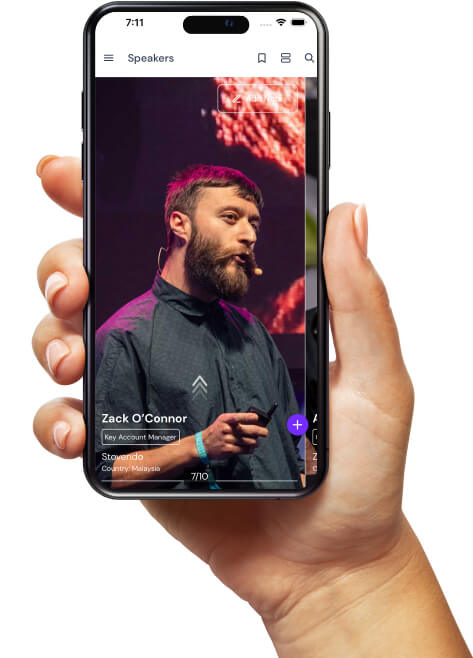
Speaker profiles include photo, location, job title, company name, and more, so attendees can find out who speakers are and what they have to share.

Bookmark & Notes
Attendees can bookmark & add notes for each speaker with upcoming sessions so they're never missed!

Sessions List
Make it easy for attendees to find out which sessions and topics each speaker will cover.

Session Files
Speakers can easily share their session files with attendees during the event, making sure that everyone has access to all materials.

Social Media Links
Make it easy for your attendees to stay connected with speakers by linking all of their relevant social media channels.
Frequently Asked Questions
What is Eventspot’s speaker and abstract management feature?
Eventspot’s speaker and abstract management feature helps speakers get the spotlight they need to interact better with attendees. Our suite of speaker and abstract management tools includes accessible speaker bios with links to social media profiles. In addition, attendees can add speaker sessions to their event agenda, which improves event engagement.
What types of events benefit most from speaker and abstract management tools?
The speaker and abstract management feature is used extensively for academic conferences, industry symposiums, workshops, and research events. But any event that emphasizes speaker-led engagement can benefit from Eventspot’s speaker and abstract management tools.
What is the process for submitting and reviewing speaker abstracts in Eventspot?
The process of submitting and reviewing abstracts in Eventspot’s speaker and abstract management system is as follows: 1. Give the abstract a clear name, describe its relevance to the event, and save the details. 2. Design the abstract submission form with easy drag-and-drop features. 3. Add reviewers (new or from your existing list) and choose a distribution method: circular, random, or manual. 4. Enter the review criteria and point range, and save. 5. Before inviting abstracts, specify the durations and resubmission guidelines. Once these are entered, you can publish the form.
Why should I use Eventspot instead of managing speaker data manually via spreadsheets or emails?
Managing speaker data manually is time-consuming and prone to human error. Eventspot’s speaker and abstract management platform streamlines speaker data management while saving valuable time.
Why is having a centralized platform for speaker and abstract management essential for large conferences or academic events?
Larger conferences and academic events often grapple with assigning reviewers, communicating with speakers, building multiple speaker profiles, managing sessions, and avoiding overlaps. All of these tasks need a centralized platform; without one, teams spend hours manually updating data in a cluttered process.
What speaker onboarding and profile management features does Eventspot offer?
Eventspot’s speaker onboarding and profile management features include: 1. Detailed speaker bios that highlight speakers' backgrounds and personalities. 2. Profiles with each speaker’s location, job title, company name, and areas of expertise. 3. Links to speakers' social media profiles to help them connect with attendees.
Can speakers upload their bios, photos, and session materials directly into the platform?
Yes, speakers can independently upload their bios, photos and session materials directly on the platform.
Does Eventspot support abstract submission with customizable forms and review workflows?
Yes. Eventspot supports abstract submission with customizable forms where you can add field types, rename fields, and rename forms. You can also customize how abstracts are distributed for review: circular, manual, or random.
Can organizers assign reviewers, manage evaluations, and approve or reject abstracts within the platform?
Yes. Organizers can assign reviewers, manage abstract evaluations, and approve, shortlist, or reject abstracts, all within the platform.
Is there support for session scheduling, speaker notifications, and real-time updates?
Yes. Eventspot’s agenda and speaker management supports session scheduling, push notifications for speaker updates, and real-time updates on any changes to sessions and speaker availability.
How does Eventspot simplify communication between organizers, reviewers, and speakers?
Eventspot’s speaker and agenda management helps organizers automate abstract review processes and lets speakers manage their own profiles. This reduces errors and makes communication simpler and more transparent.
What problems does Eventspot solve for organizers managing hundreds of speaker sessions or abstract submissions?
Eventspot streamlines the entire abstract and speaker management process for organizers managing hundreds of speakers and abstracts. The abstract review and acceptance process is made efficient with customized forms that encourage participation of invitees. Session details are shared with attendees with time and date details and the topics. Speakers can also share session files with attendees.
Schedule a
personalized demo.
See how Eventspot elevates the experience for your attendees. Explore what modern event tooling can do for you, with a free demo tailored to your goals.

Features
Explore Our Most
Popular Features


See How Eventspot Elevates Every Event
We are committed to making your event a success.
Complete the form to request a demo & we will show you why event teams are choosing Eventspot.
Flexible plans with transparent pricing.
Complete the form to request a demo & we will show you why event teams are choosing Eventspot.
Flexible plans with transparent pricing.
Request A Free Trial
Thank you! Your submission has been received!
Oops! Something went wrong while submitting the form.

