sCHEDULE sESSIONS

Plan and Schedule Your Event Sessions

Eventspot is the ultimate event platform to streamline and simplify event scheduling while giving you access to many features that help you get the most out of your event.
Request Demo

A woman holding a laptop and a man standing with arms crossed, both wearing glasses and smiling.
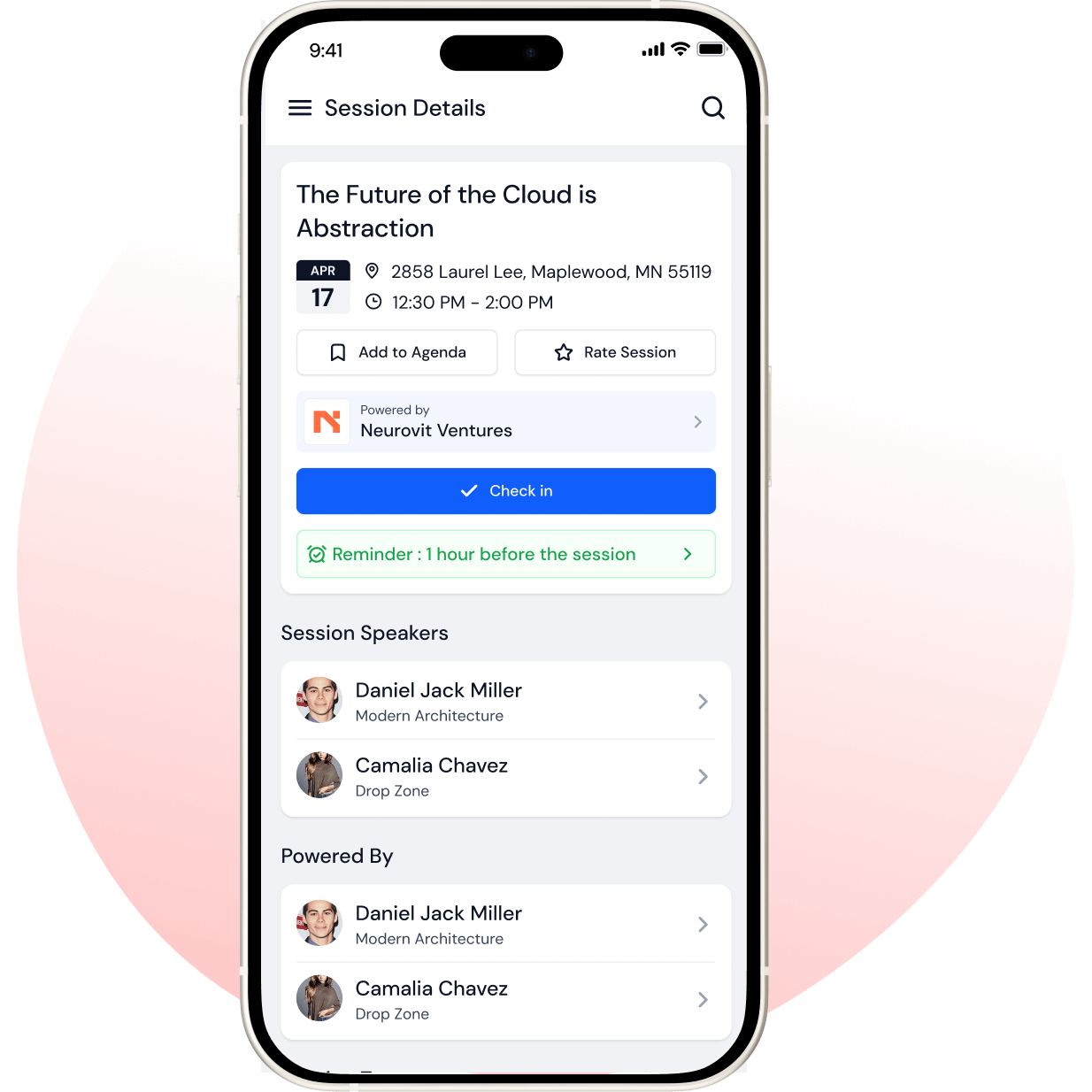
Mobile screen showing session details for 'The Future of the Cloud is Abstraction' with date April 17, location 2858 Laurel Lee, Maplewood, MN, time 12:30 PM to 2:00 PM, options to add to agenda, rate session, check-in button, and reminder set 1 hour before session, plus speaker info for Daniel Jack Miller and Camalia Chavez.
SESSION PLANNING

Beautiful Dynamic Schedule for Your Event

Always know when the next session starts. Registrations, session schedules, attendee tracking, speakers, and more are all in one place, so you can focus on what's important: creating a memorable experience!
check icon
Plan with Ease: Planning your event has never been easier! Use Eventspot to easily schedule your sessions and keep track of who's coming.
check icon
Create Sessions: Create multiple tracks and sessions for a single event, book in-person or live sessions, set the ticket price, embed sessions on your website, send reminders, and more.
Learn more
right arrow icon
Interactive features

Schedule, Track, and Attend

Eventspot is the ultimate event schedule app. Build a schedule of events, track attendees, and view sessions in one place.
Calendar icon representing event schedule

Multiple Tracks and Sessions

Create as many sessions as you would like for each track. You can even create sessions for every hour of your event!
an user profile icon representing attendee profile

Conference Attendee Tracking

We offer attendance tracking with check-in features and session reminders, so you know exactly who is where, and when.

logo of Future Connect

Live and In-Person Sessions

Broadcast your event live, so that attendees can experience it simultaneously via their screens.
Microphone icon representing speakers feature

Support for Multiple Speakers

You can now have more than one speaker per session without any hassles.
Newspaper icon representing news section

Share Your Session Files

Speakers can easily share their session files with attendees during the event, making sure that everyone has access to all materials.
Checkmark icon representing survey feedback

Attendee Session Schedule Builder

Attendees can bookmark & set reminders for upcoming sessions so they're never missed!

Frequently Asked Questions

What is Eventspot’s Event Agenda Management feature?
Eventspot’s Event Agenda Management feature streamlines and simplifies scheduling by helping organizers create multiple sessions, including live and in-person sessions, and send reminders.
What types of sessions and formats (keynotes, breakouts, panels, etc.) can be included in the agenda?
You can include any session type in the agenda and share regular reminders to make sure no sessions are missed.
What devices or platforms can attendees use to access the event agenda?
Attendees can use their own mobile phones to access the event agenda. They just need to download Eventspot’s mobile event app, log in, and start building their agenda.
Why should I use Eventspot to manage my agenda instead of using spreadsheets or PDFs?
Eventspot’s agenda manager offers a unified platform for managing your agenda. Attendees can access it in seconds in the Eventspot app. With notifications about upcoming sessions and schedule changes, plus access to session notes and resources, the Agenda Manager is an interactive tool that eliminates manual session tracking, a key problem with spreadsheets and PDFs.
Why is a dynamic, digital agenda critical for attendee engagement and satisfaction?
A dynamic, digital agenda builder like Eventspot is key to attendee engagement. Our Agenda module helps attendees add interesting sessions to their schedule with no overlaps. Attendees can access session files, bookmark sessions, and set reminders so no session is missed. This boosts engagement and satisfaction.
Can attendees filter the agenda by track, topic, or speaker?
Yes, attendees can filter their agenda by topic and speaker.
Does Eventspot support real-time updates and changes to the agenda?
Yes, you can make real-time updates to sessions, speakers, and event tracks. Attendees are notified and can keep track of changes in their agenda.
How does agenda personalization (e.g., favoriting sessions) improve attendee experience?
Attendees can add sessions and schedule their day using the personalized agenda feature. This creates an event experience that is personalized for attendee needs, making attendees feel deeply engaged with the event.

Schedule a
personalized demo.

See how Eventspot elevates the experience for your attendees. Explore what modern event tooling can do for you, with a free demo tailored to your goals.

Three smiling young adults with arms crossed, wearing casual plaid and denim shirts.
Features

Explore Our Most
Popular Features

Icon representing add or new item button
Learn more
Ticket icon representing event ticketing

Registration & Ticketing

Sell tickets online & manage user registration
Icon representing add or new item button
Learn more
Speech bubble icon representing messaging feature

Chat & Meetings

1-1 messaging and meetings to increase attendee engagement
Icon representing add or new item button
Learn more
Calendar icon representing event schedule

Schedule

Event tracks & sessions as per date and time in one place
Icon representing add or new item button
Learn more
User icon representing registration feature

Matchmaking

All-in-one B2B matchmaking for your attendees
Icon representing add or new item button
Learn more
Share icon representing social sharing feature

Social Feed

Private social network feed for your event
Icon representing add or new item button
Learn more
Multiple people icon representing community section

Community Forum

Forum or group messaging on predefined topics
Icon representing add or new item button
Learn more
Bar chart icon representing analytics dashboard

Poll & Live Q&A

Create interactive polls and Q&A on live sessions
Icon representing add or new item button
Learn more
Microphone icon representing speakers feature

Speaker Profile

Speaker’s detailed information for sessions
Icon representing add or new item button
Learn more
Newspaper icon representing news section

Event News

A news section for event-related news & announcements
Icon representing add or new item button
Learn more
Info icon representing event guide section

Event Guide

Create your own event help and support guidebook
Icon representing add or new item button
Learn more
Image icon representing photo gallery

Gallery

Event photo gallery by host or attendees
Icon representing add or new item button
Learn more
Storefront icon representing exhibitor booths

Product Showcase

Comprehensive exhibitor and sponsor page
Icon representing add or new item button
Learn more
Crown icon representing sponsors section

Sponsored Ads

Built-in ads to promote sponsors & exhibitors
Icon representing add or new item button
Learn more
Checkmark icon representing survey feedback

Lead Scanning

Scan and export leads and contacts in one place
Icon representing add or new item button
Learn more
Map icon representing interactive venue maps

Interactive Maps

Tappable interactive booth and floor maps
Icon representing add or new item button
Learn more
Bell icon representing outreach notifications

Push Notification

Send instant push notifications to attendee app
Icon representing add or new item button
Learn more
Trophy icon representing gamification features

Custom Branding

Customize & design your very own branded event app within minutes
Icon representing add or new item button
Learn more
Calendar icon representing event schedule

Session Rating

Get session rating and feedback from attendees
Icon representing add or new item button
Learn more
Bar chart icon representing poll or voting features

Survey

Build your own surveys to get feedback about the event
Icon representing add or new item button
Learn more
Bell icon representing outreach notifications

Email Notifications

Send instant email notifications to your attendees
Icon representing add or new item button
Learn more
Newspaper icon representing news section

Dynamic Form Builder

Drag & drop form builder for checkout forms, surveys & profiles
Icon representing add or new item button
Learn more
Calendar icon representing event schedule

Schedule

Event tracks & sessions as per date and time in one place
Icon representing add or new item button
Learn more
Info icon representing event guide section

Event Guide

Create your own event help and support guidebook
Icon representing add or new item button
Learn more
Checkmark icon representing survey feedback

Email Designer

Drag and Drop custom email template designer
Icon representing add or new item button
Learn more
Bar chart icon representing analytics dashboard

Analytics Dashboard

Get real-time insights on your event on multiple fronts
Icon representing add or new item button
Learn more
Multiple people icon representing community section

Community Forum

Forum or group messaging on predefined topics
Icon representing add or new item button
Learn more
Speech bubble icon representing messaging feature

Chat & Meetings

1-1 messaging and meetings to increase attendee engagement
Icon representing add or new item button
Learn more
Ticket icon representing event ticketing

Registration & Ticketing

Sell tickets online & manage user registration

See How Eventspot Elevates Every Event

We are committed to making your event a success.

Complete the form to request a demo & we will show you why event teams are choosing Eventspot.
Flexible plans with transparent pricing.

Request A Free Trial

@
Features Interested in (Choose All That Apply):*
Thank you! Your submission has been received!
Oops! Something went wrong while submitting the form.
Monitor icon
Free Demo