
event.spot logo
event.spot logoWhy Eventspot
Platform
Core Products
Event Management Software
Event Registration Software
Event Ticketing Software
On-Site Badge Printing
Event Check-in Software
Lead Capture & Retrieval
Mobile Event App FEATURED
Event Management
Budget Planner
Speakers & Abstracts Mgmt.
Maps or Floor Plan Builder
Agenda Management
Event Reporting & Analytics
Attendee Engagement
Meetings & Matchmaking
Event Networking App
Gamification
Live Polls & QA
Community Builder
Event AI
NEW
More Platform Tools
Custom Branding & Whitelabeling
Widgets & Embeds
Security and Compliance
Pricing Plans
Request a Demo
Solutions
industries
Non-Profit Organizations
Corporate Events
Education
Information Technologies
Healthcare
Pharma
Retail
Event Agencies
USE CASES
Onsite Event Management
Virtual Exhibitions
Hybrid Events
Community Meetups
Workshops & Trainings
B2B Conferences
Expo and Fairs
Trade Shows
Virtual Job Fairs
Medical Events
Product Launches
Sales Kickoffs
Education Events
Networking Events
Learning & Development
Internal Events
Awards & Recognition
White Label Mobile Apps
Native Event App
Deliver a seamless event experience with your own branded app.
Event Networking App
Empower networking and collaboration within your event.
Lead Scan & Retrieval App
Simplify lead scanning and retrieval for exhibitors and sponsors.
Pricing Plans
Request a Demo
Features
Content Management
Event Website Builder
Agenda Builder
Speaker Profile
News
Event Guide
Social Boost
Live Screen Display
Registration
Event Ticketing
Check-in Software
Abstract Management
Badge Printing
Dynamic Form Builder
Floor Planner
Event Itinerary
Exhibitors & Sponsors
Exhibitor Profile
Sponsored Ads
Lead Scanning
Interactive Maps
Engagement
Event AI
Matchmaking
Chat & Meetings
Social Feed
Community Forum
Poll & Live Q&A
Gamification
Communications
Instant Push Notification
Email Notification
mORE tOOLS
Event Surveys
Analytics & Reporting
Pricing Plans
Request a Demo
Resources
Company
About Eventspot
Security & Compliance
Resources
Knowledge Base
FAQs
Support
Contact Us
Tools
Event QR Code Generator
Sponsorship ROI Calculator
Event Budget Calculator
Event WhatsApp Templates
Pricing Plans
Request a Demo
Pricing
Request a Demo
Contact Us
Request a Demo
Download Eventspot Feature Presentation
Topics

How to Schedule?

event.spot Knowledge Base

How to Add Private Sessions?

When you require some sessions to be available only to specific users or groups (not to all attendees), you shall choose the private sessions. Private sessions are only visible to exclusive attendees who have a valid ticket or access. The other attendees will not be allowed to attend the private session in the app. 

Login to Eventspot Admin Panel and click on Content> Schedule 
__wf_reserved_inherit

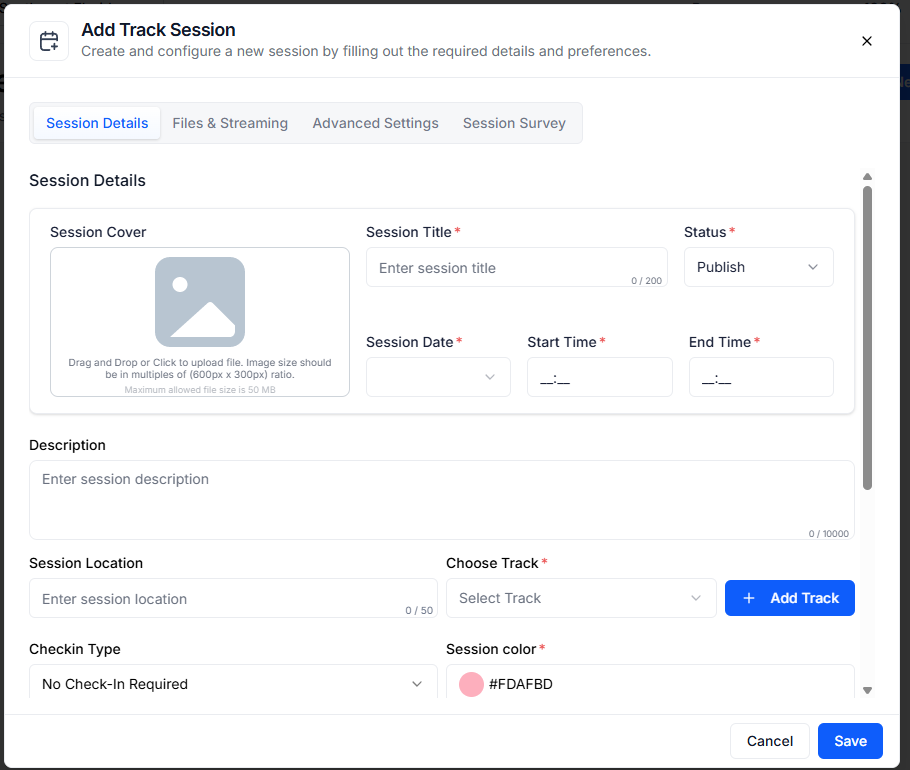
Go to “New Session” or you may edit an existing session. Fill in the session details. Click on “Additional Settings” and you will see there are 4 types of sessions. From here, you can make your sessions private in two ways. You can choose any of the options: 

__wf_reserved_inherit
  1. General & Private (Visible to attendees added by the host manually)

By choosing this option, you will be able to add attendees manually. Click on “+View/Manage Users” and you can choose which speakers, exhibitors or attendees you want to get direct access to private sessions. This session will be visible to attendees who are added by the host manually. 

__wf_reserved_inherit
  1. With Ticket & Private (Visible to only valid ticket holder attendee) 
__wf_reserved_inherit

If you don’t know about your exact attendees, you can keep it ticket-based and you can select tickets for this. Attendee will get access to this session only when he/she buys a ticket. Private sessions are visible and attenable exclusively to those attendees holding a valid ticket. 

🔔 If you tick on the box for “Allow Reassign”, the user can change the session at any point of time and it would be notified to the attendees. 

Also, if you want to create private tickets for private sessions, go to Tickets > Manage Tickets. 

__wf_reserved_inherit

Go to any existing ticket or create a new ticket, scroll down a bit and select the ticket status as ‘Hidden’. These hidden tickets will not be displayed in the main ticket page, only the URL can be shared externally. Thus, you can create a session exclusively available for a targeted audience group or specific users. 

__wf_reserved_inherit
The future of events
is here.
PLATFORMS
Virtual Event PlatformHybrid Event PlatformIn-person Event PlatformMobile Event AppExpo & ExhibitionEvent Management PlatformEvent Registration PlatformCorporate Event SoftwareTrade Show AppTrade Show Management Software
PRODUCTS
Event Ticketing SoftwareEvent Check-in AppEvent Badge PrintingTicket Sales ReportLead Retrieval AppEvent Networking AppEvent Gamification AppEvent Poll & Q&AEvent Matchmaking AppEvent Concierge Service
RESOURCES
ContactAboutFAQ
OTHERS
Privacy PolicyTerms of UseSite MapSecurity
Eventspot is built with enterprise-grade security
event.spot logo on dark background
© Eventspot 2026. All rights reserved.
FacebookTwitterInstagramLinkedinYouTube icon