event.spot logo
event.spot logoWhy Eventspot
Platform
Core Products
Event Management Software
Event Registration Software
Event Ticketing Software
On-Site Badge Printing
Event Check-in Software
Lead Capture & Retrieval
Mobile Event App FEATURED
Event Management
Budget Planner
Speakers & Abstracts Mgmt.
Maps or Floor Plan Builder
Agenda Management
Event Reporting & Analytics
Attendee Engagement
Meetings & Matchmaking
Event Networking App
Gamification
Live Polls & QA
Community Builder
Event AI
NEW
More Platform Tools
Custom Branding & Whitelabeling
Widgets & Embeds
Security and Compliance
Pricing Plans
Request a Demo
Solutions
industries
Non-Profit Organizations
Corporate Events
Education
Information Technologies
Healthcare
Pharma
Retail
Event Agencies
USE CASES
Onsite Event Management
Virtual Exhibitions
Hybrid Events
Community Meetups
Workshops & Trainings
B2B Conferences
Expo and Fairs
Trade Shows
Virtual Job Fairs
Medical Events
Product Launches
Sales Kickoffs
Education Events
Networking Events
Learning & Development
Internal Events
Awards & Recognition
White Label Mobile Apps
Native Event App
Deliver a seamless event experience with your own branded app.
Event Networking App
Empower networking and collaboration within your event.
Lead Scan & Retrieval App
Simplify lead scanning and retrieval for exhibitors and sponsors.
Pricing Plans
Request a Demo
Features
Content Management
Event Website Builder
Agenda Builder
Speaker Profile
News
Event Guide
Social Boost
Live Screen Display
Registration
Event Ticketing
Check-in Software
Abstract Management
Badge Printing
Dynamic Form Builder
Floor Planner
Event Itinerary
Exhibitors & Sponsors
Exhibitor Profile
Sponsored Ads
Lead Scanning
Interactive Maps
Engagement
Event AI
Matchmaking
Chat & Meetings
Social Feed
Community Forum
Poll & Live Q&A
Gamification
Communications
Instant Push Notification
Email Notification
mORE tOOLS
Event Surveys
Analytics & Reporting
Pricing Plans
Request a Demo
Resources
Company
About Eventspot
Security & Compliance
Resources
Knowledge Base
FAQs
Support
Contact Us
Tools
Event QR Code Generator
Sponsorship ROI Calculator
Event Budget Calculator
Event WhatsApp Templates
Pricing Plans
Request a Demo
Pricing
Request a Demo
Contact Us
Request a Demo
Download Eventspot Feature Presentation
Topics

User Registration

event.spot Knowledge Base

How To Add And Sell Booths On A Floor Map?

Add and sell exhibitor booths using the interactive floor map feature in your Eventspot dashboard. Here's how:

Open the Floor Map Designer

Go to Registration > Floor Maps > Map List, create a new one or click Design on the map you want to work on from the existing ones. Use the toolbox on the left to draw a shape for your booth.

__wf_reserved_inherit

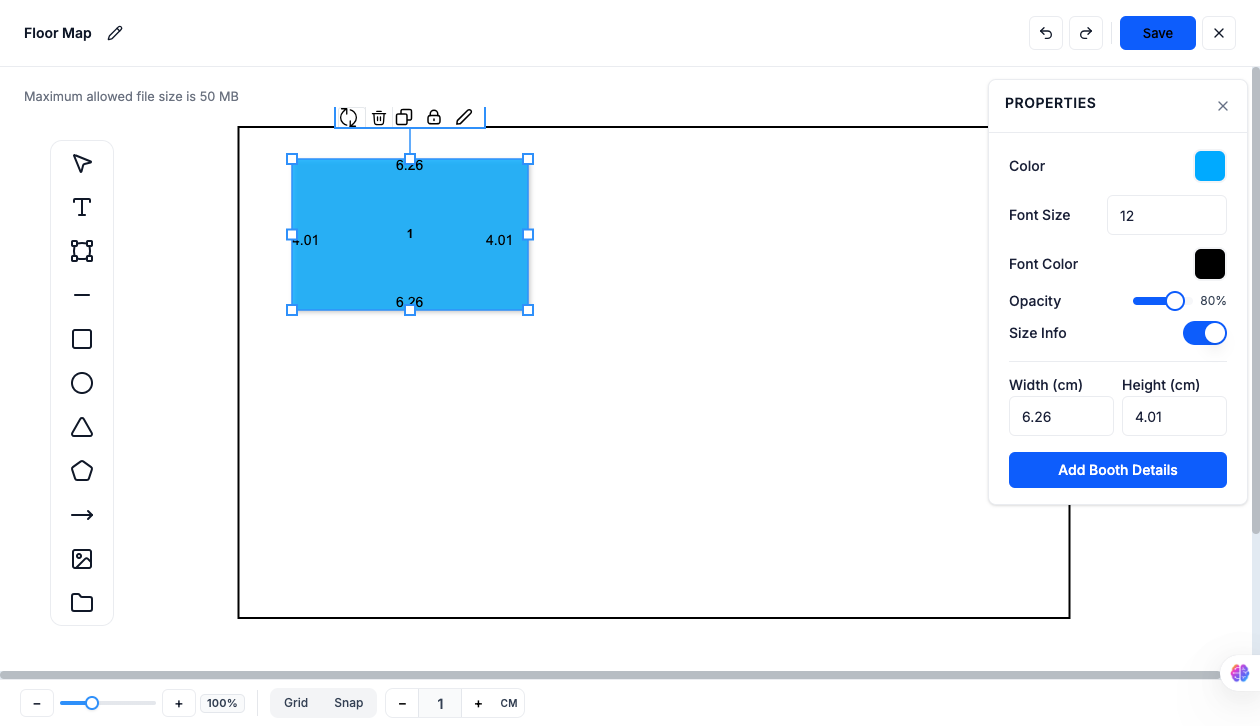
Set Booth Properties

With the shape selected, use the Properties panel to set Color, Font Size, Font Color, and Opacity. Toggle Size Info on to display Width and Height (cm) on the map. When ready, click Add Booth Details.
__wf_reserved_inherit

Add Booth Details

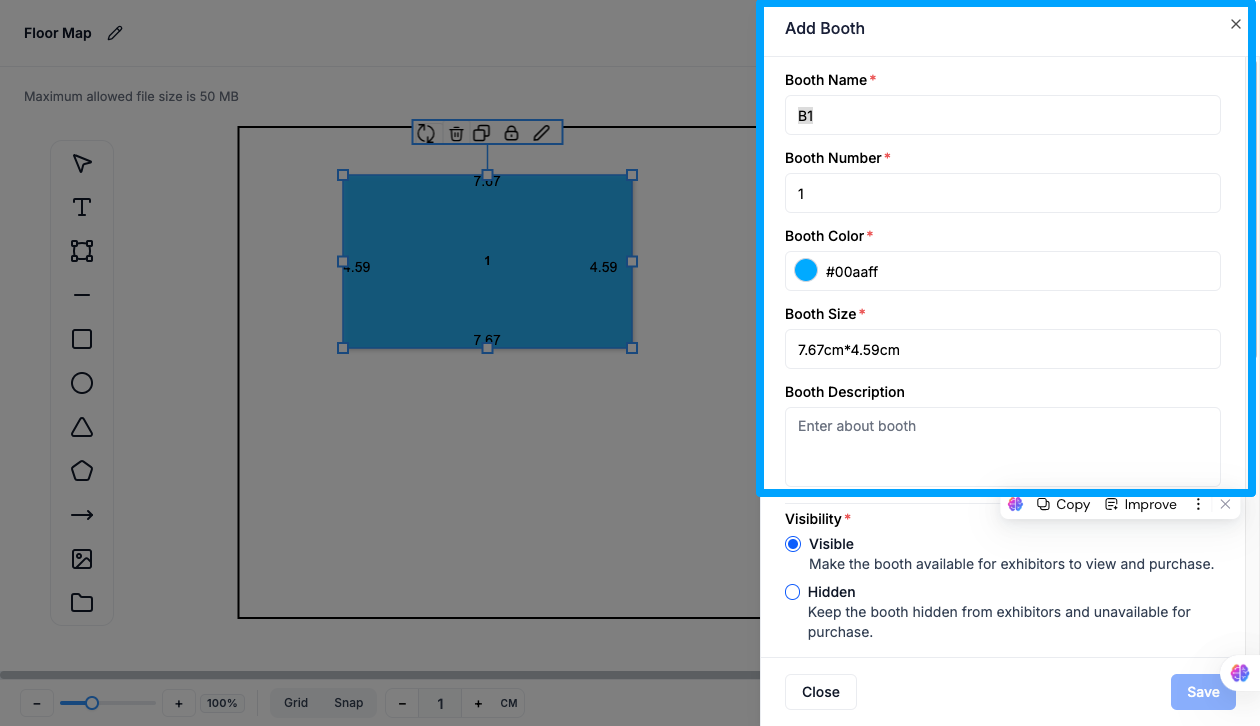
In the Edit Booth panel, fill in:

  • Booth Name and Booth Number
  • Booth Color
  • Booth Size (auto-filled from the shape's dimensions)
  • Booth Description
__wf_reserved_inherit

Set Visibility

  • Visible: Makes the booth available for exhibitors to view and purchase.
  • Hidden: Keeps the booth hidden from exhibitors and unavailable for purchase.
__wf_reserved_inherit

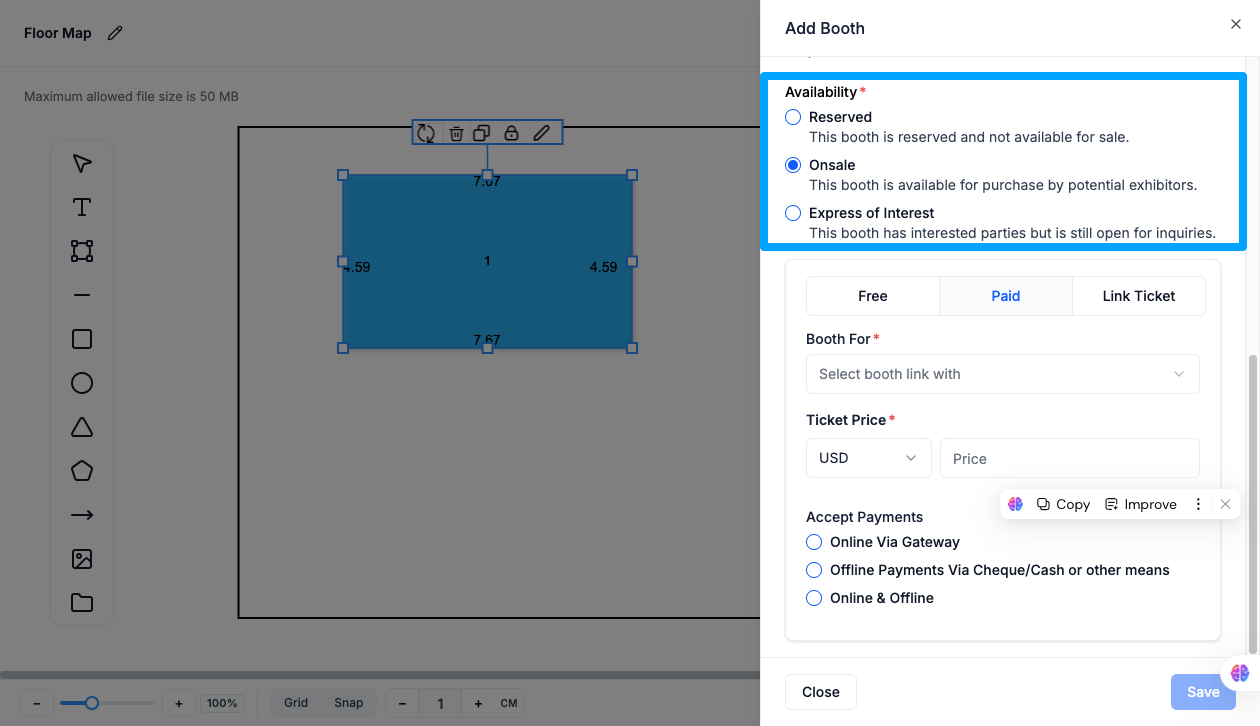
Set Availability

  • Reserved: The booth is reserved and not available for sale.
  • Onsale: The booth is available for purchase by potential exhibitors.
  • Express of Interest: The booth has interested parties but is still open for inquiries.
__wf_reserved_inherit

Configure an Onsale Booth

Choose Free, Paid, or Link Ticket. For Paid, set:

  • Booth For (e.g. Sponsor) and Sponsor Category (e.g. Bronze)
  • Ticket Price (currency and amount)
  • Accept Payments: Online Via Gateway, Offline Payments Via Cheque/Cash, or Online & Offline
__wf_reserved_inherit

Save the Booth

Click Save to add the booth to your floor map. Use Delete to remove a booth, or Close to exit without saving.

Share Your Floor Map

Open the map's Settings (gear icon) from the Map List to share it in one of two ways:

  • Floor Map Link: Copy the URL or click Visit to let attendees view and buy booths directly on that page.
  • Embed as iFrame: Copy the embed code to add the floor map to your own website. Check Hide Header if you'd like to hide the Eventspot logo and header when embedded.
__wf_reserved_inherit

Note on On Hold Status: If a booth is On Hold, the Buy button won't be shown to other attendees. A booth can only be purchased or booked by one person at a time — On Hold means it's currently under negotiation or a party is actively considering purchasing it.

FAQs

Q: What's the difference between Reserved, On Hold, and Onsale?
Reserved means the booth isn't for sale at all. On Hold means it's temporarily unavailable while under negotiation but may open up again. Onsale means it's actively available for purchase.

Q: Can I hide a booth without deleting it?
Yes. Set Visibility to Hidden — the booth stays on the map data but won't be visible or purchasable by exhibitors until switched back to Visible.

Q: What's the difference between Onsale and Express of Interest?
Onsale lets exhibitors purchase the booth directly. Express of Interest collects inquiries from interested parties via a linked form, without committing to an immediate sale.

Q: Can I sell a booth using a ticket I've already created?
Yes. When configuring an Onsale booth, choose Link Ticket to sell it through a pre-created ticket instead of setting a new price.

Q: Where do I find the payment link after setting up a Paid booth?
Once you save a Paid Onsale booth, a Booth Payment Link appears in the Edit Booth panel that you can copy and share directly.

Q: Can I use a custom form to collect interest for a booth?
Yes. In Express of Interest, use Link Form to select an existing form, or Link New to build a custom one.

Q: Does Booth Size update automatically when I resize the shape on the map?
Yes. The Width and Height set in Properties feed directly into the Booth Size shown in Edit Booth details.

Q: What's the difference between sharing the Floor Map Link and embedding it as an iFrame?
The Floor Map Link takes attendees to a standalone Eventspot page to view and buy booths. Embedding as an iFrame lets you display that same floor map inside a page on your own website instead.

Q: Will the Eventspot logo show up if I embed the floor map on my site?
Only if you leave Hide Header unchecked. Check it if you'd rather the embedded map blend in without the Eventspot logo and header.

The future of events
is here.
PLATFORMS
Virtual Event PlatformHybrid Event PlatformIn-person Event PlatformMobile Event AppExpo & ExhibitionEvent Management PlatformEvent Registration PlatformCorporate Event SoftwareTrade Show AppTrade Show Management Software
PRODUCTS
Event Ticketing SoftwareEvent Check-in AppEvent Badge PrintingTicket Sales ReportLead Retrieval AppEvent Networking AppEvent Gamification AppEvent Poll & Q&AEvent Matchmaking AppEvent Concierge Service
RESOURCES
ContactAboutFAQ
OTHERS
Privacy PolicyTerms of UseSite MapSecurity
Eventspot is built with enterprise-grade security
event.spot logo on dark background
© Eventspot 2026. All rights reserved.
FacebookTwitterInstagramLinkedinYouTube icon